







Skip to content
  • Privacy Policy
  • Contact Us
  • About US
CampusTimesNG

CampusTimesNG

Complete Campus Updates Just For You

  • Home
  • Admission
  • Institutions
  • Scholarship
  • Jamb CBT
  • Study Abroad
  • Career
  • NYSC
  • O’level
  • Toggle search form
  • First bank USSD code
    Fidelity Bank Airtime Recharge Code! Buy Airtime From Your Bank Account General
  • Maritime Colleges in Nigeria
    Full List – Top 10 Maritime Colleges in Nigeria Admission
  • Zenith Bank Quick Service Codes
    Zenith Bank Quick Service Codes For Easy Banking General
  • Internet Banking
    Internet Banking From The Comfort Of Your Home General
  • Federal College Of Education Oyo Courses
    Federal College Of Education Oyo Courses, Cut Off Marks & Requirements Institutions
  • Receive Money Through Western Union
    How To Receive Money Through Western Union Money Transfer (WUMT) General
  • Canada visitor Visa Requirements
    Canada Visitor Visa Requirements- How To Apply? General
  • ADSU Cut-Off Mark For Admission Admission
activate do not disturb service

How to Activate Do Not Disturb Service On All SIM

Posted on August 26, 2026 By CampusTimesNG No Comments on How to Activate Do Not Disturb Service On All SIM

Are you looking for steps to?activate Do Not Disturb Service on your SIM card, a service that will block and exempt you from receiving all unwanted calls and messages??activating the DO NOT DISTURB service gives subscribers the freedom to choose what messages to receive from the various networks.

Are you tired of messages you never asked for, even when you are trying to conserve your battery, these messages keep coming in to further drain the battery? Do you want to stop receiving these calls and unwelcome messages?
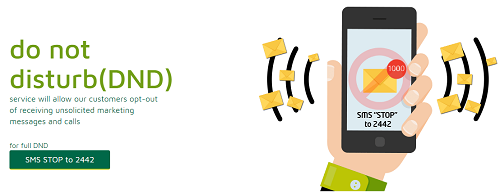
activate do not disturb service

Then this article is meant for you and by the time you finish reading, you will know how to activate Do Not Disturb (DND) Service and able to block all unwanted messages, your number will be registered in the database of the National Do Not Call Registry (NDNC) like the case in India.

The NDNC Registry is a database having the list of all telephone numbers of the subscribers who do not want to receive commercial calls or SMS. Telemarketers have to verify the calling number list in the NDNC registry before making a call. So rest assured, the telemarketers will not trouble you else they will be fined for calling you.

?Do Not Disturb?. generally referred to as DND service allows our customers to opt-out of receiving unsolicited third party marketing messages and calls. Below are possible questions you may want to know about Do not disturb service and their answers.

1. What are the features of Do Not Disturb Service?

Full Blacklist:?This allows customers to opt out of all third party marketing messages

Partial Blacklist:?This allows customers to opt out of specific third party service categories e.g. sports, religion, Entertainment etc.

2. How much does it cost to use the DND?

The DND service is free for all customers.

3. How do I remove my number from the DND list?

To remove your number from the DND list, text START to 2442.

In fact, a Full DND which is SMS ?STOP? to 2442 does not allow the subscriber to receive any unsolicited message from the operators at all.

4. How much does it cost to activate Do Not Disturb service?

The service is free to all customers.

5. How do I add my number to the DND list?

? To fully blacklist your number from all third party marketing messages, SMS STOP to 2442.

? For partial blacklisting from some service categories, to 2442. The SMS codes and their respective service categories are:

6. How to activate Do Not Disturb service?

The following SMS keywords can be used to activate your Do Not Disturb service
To get started, Simply text?HELP?to the shortcode?2442?to find out more.

After sending?HELP?to?2442, the options in the table below will be displayed

  • For banking, insurance &financial products related texts;
    text 1 to 2442
  • Real estate: text 2 to 2442
  • Education: text 3 to 2442
  • Health: text 4 to 2442
  • Consumer goods & automobiles
    text 5 to 2442
  • communication/broadcasting/entertainment/IT: text 6 to 2442
  • Tourism & leisure: text 7 to 2442
  • Sports: text 8 to 2442
  • Religion related messages and calls: text 9 to 2442

You can text ?LIST? to 2442 to view the partial blacklist keywords.

To Check DND Status STATUS

Will I still receive contents I subscribed for after adding my number to the DND list?

Yes. The DND service only applies to third party marketing messages. You will need to opt out of the existing service. To opt out of a specific service text ?HELP? or ?STOP? to the shortcode.

If you need us to help you with more updates regarding Do Not Disturb Services and other vital information on its activation and deactivation, kindly provide us your phone number and a valid email Address in the comment box below.

Also feel free to ask any question with respect to this and other useful?information.

We do hope this piece of information was helpful to you, if yes, do not hesitate to use the share button below to inform, family, friends and loved ones via Facebook, Twitter handle.


General

Post navigation

Previous Post: List Of Ghanaian Universities And Their School Fees
Next Post: Hassan Usman Katsina Polytechnic Courses & Requirements

Related Posts

  • Age Limits For Immigration
    What Is The Maximum Age Limits For Immigration To Canada General
  • Mtn Network Sim Swap
    Mtn Network Sim Swap In Nigeria – Processes & Benefits! General
  • Payday Loan
    How To Avoid A Payday Loan Scam General
  • N-Power 2022 Recruitment
    N-Power 2025 Portal Now Open For Recruitment- Apply! General
  • Open Ecobank Account with Mobile Phone
    EcoBank USSD: How To Open Ecobank Account With Mobile Phone General
  • N-Power 2022 Recruitment
    N-Power Recruitment Requirements And Criteria General

More Related Articles

Airtel Free Data Bonus Enjoy 20GB FREE – Unlimited Airtel Free Data Bonus 2026 General
Olusegun Obasanjo Net Worth, Fortune General
Yemi Osinbajo Net Worth, Fortune General
Sterling Bank Money Transfer Code How to Transfer Money With Sterling Bank Money Transfer Code General
Web Hosting Companies For Nigerian Bloggers Top 5 Best Web Hosting Companies For Nigerian Bloggers General
10 Best Transport Companies in Nigeria General

Leave a Reply Cancel reply

Your email address will not be published. Required fields are marked *

scaleitpro

Navigation Links

  • Admission
  • Australia
  • Canada
  • Career
  • General
  • Immigrate
  • Institutions
  • Jamb CBT
  • Jobs
  • NYSC
  • O'level
  • Scholarship
  • Schoolings
  • Study Abroad
  • USA
  • Visa
scaleitpro1
  • First Bank USSD code
    First Bank USSD: Check Account Balance on phone! General
  • how to calculate CGPA in the National Open University
    How To Calculate CGPA In The National Open University Of Nigeria Institutions
  • Skoll MBA Scholarships at University Of Oxford
    Skoll MBA Scholarships at University Of Oxford in UK Scholarship
  • JABU Cut-Off Mark
    Joseph Ayo Babalola University JABU Cut-Off Mark For Admission Admission
  • Heritage bank money transfer code
    How To Transfer Money with Heritage Bank Money Transfer Code General
  • Top 7 Reasons Intelligent Students Score Low In Jamb Jamb CBT
  • Domiciliary Account
    How To Open A Domiciliary Account With First Bank General
  • UNIPORT Omitted UTME/DE Admission List
    FUTO Pre-degree Admission List 2026/2027 Out? Admission

Gallery

Nigerian Navy School of Health Sciences Offa
Canada Visitor Visa
Child to a Christian school
Ogun State College of Nursing Sciences

Recent Posts

  • University Of Calabar Courses & Requirements
  • Delta State University Courses & Requirements Cut Off Mark
  • ACEONDO Part Time Degree Admission

Recent Comments

  • CampusTimesNG on LASU Departmental Cut-Off Mark For Admission | Post-UTME Screening Date
  • ogunjobi masturah on LASU Departmental Cut-Off Mark For Admission | Post-UTME Screening Date

Calendar

August 2026
M T W T F S S
 12
3456789
10111213141516
17181920212223
24252627282930
31  
« Jul    

Copyright © 2024 CampusTimesNG. All Rights Reserved.

Need help? Our team is just a message away

Loading Comments...